Best Cheap Proxies 2026: 7 Affordable Services Worth Your Money

When scraping at large scale or managing accounts in bulk, you may want cheap proxies.
What comes to mind when you hear "cheap proxies"? For many, it's low-quality IPs that get blocked on every other request. That's not what we mean here. Unlike free proxies, which are often overcrowded, slow, and blocked everywhere, the cheap proxies in this guide come with high success rates. They're affordable and stable.
The cost of proxies varies depending on the provider, type, and order size. And while a proxy provider might advertise the cheapest prices on their landing page, what really matters is what you're getting. If you're forced into $30–$50 per month commitments just to get a reasonable rate, with no true pay-as-you-go option for small tests, then even $1 per GB is too expensive for what you actually need.
Below, we compare 7 of the cheapest proxy providers based on pricing, key features, and real use cases, so you can find an affordable proxy without compromising on quality.
📊 Quick Price Snapshot: Pick the Cheapest Plan that Suits You
Provider | 1G Residential Traffic Plan | 25G Residential Traffic Plan | ISP Proxies | Datacenter Proxies |
IPcook | $3.20 | $60.00 | $0.05/IP/day for 10 IPs | $0.04/IP/day, 10 IPs |
Webshare | $3.50 | $65.00 | $0.30/IP/month for 20 IPs | $0.0299/IP/month, 100 IPs |
NetNut | — | — | $14.4/GB, 7GB | $1.00/GB, 100GB |
SOAX | — | $90 | — | $0.62/GB, 145GB |
ProxySeller | $3.50 | $60 | $1.50/IP/week for 1 IP | $0.80/week for 1 IP |
Bright Data | $4.00 | — | $1.80/IP/month for 10 IPs | $1.40/IP/month, 10 IPs |
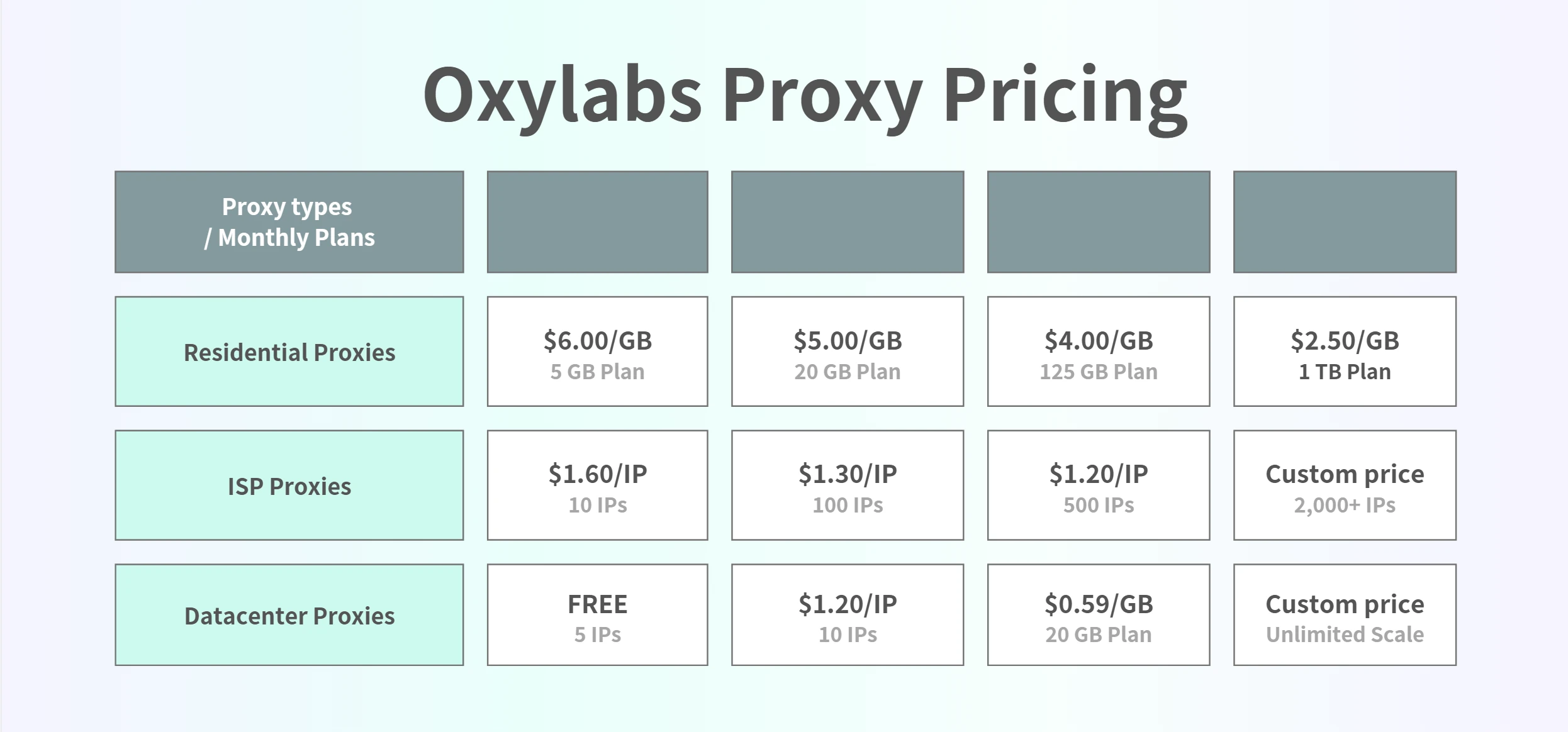
Oxylabs | — | — | $1.60/IP/month for 10 IPs | $1.20/IP/month, 10 IPs |
1. IPcook
Cheapest Proxies with flexible Pay-as-you-go Plan
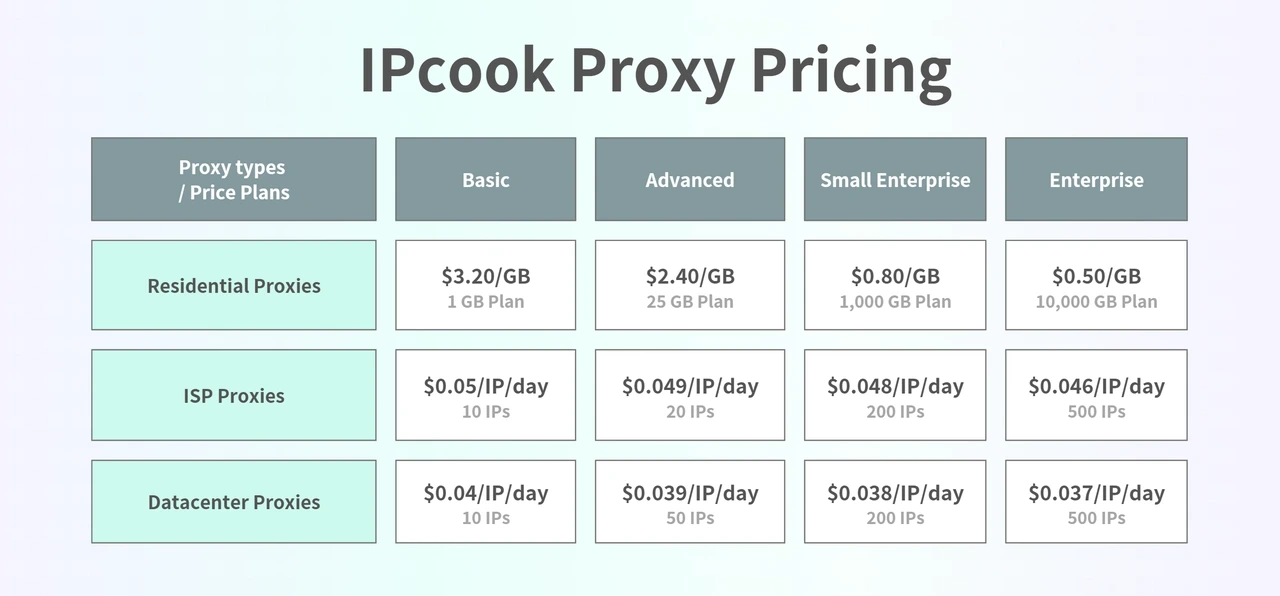
IPcook offers a flexible, budget-friendly proxy solution with residential, ISP, and data center options on a single platform. Residential traffic drops as low as $0.50/GB on bulk plans, and all traffic is non-expiring, so you pay only for what you use. It is perfect for large‑scale web scraping, such as scraping Amazon product data, extracting eBay marketplace listings, and scraping Shopify store data, as well as for digital marketing campaigns.
IPcook delivers clean IPs that are far more reliable than free proxy lists or overcrowded shared pools. For warming up and managing multiple accounts, its ISP proxies start at just $0.05/IP and include unlimited traffic.
Key features:
Proxy types: Residential, ISP, Datacenter
Locations: 185+ countries
Non-expiring residential traffic
Free 10 sub-accounts included for team access
Support: 24/7 customer support and live chat
Free trial: 100MB for residential proxies
Payment: PayPal, credit card, Google Pay, cryptocurrency and more
Pricing:
2. Webshare
Fast datacenter speeds at budget-friendly rates
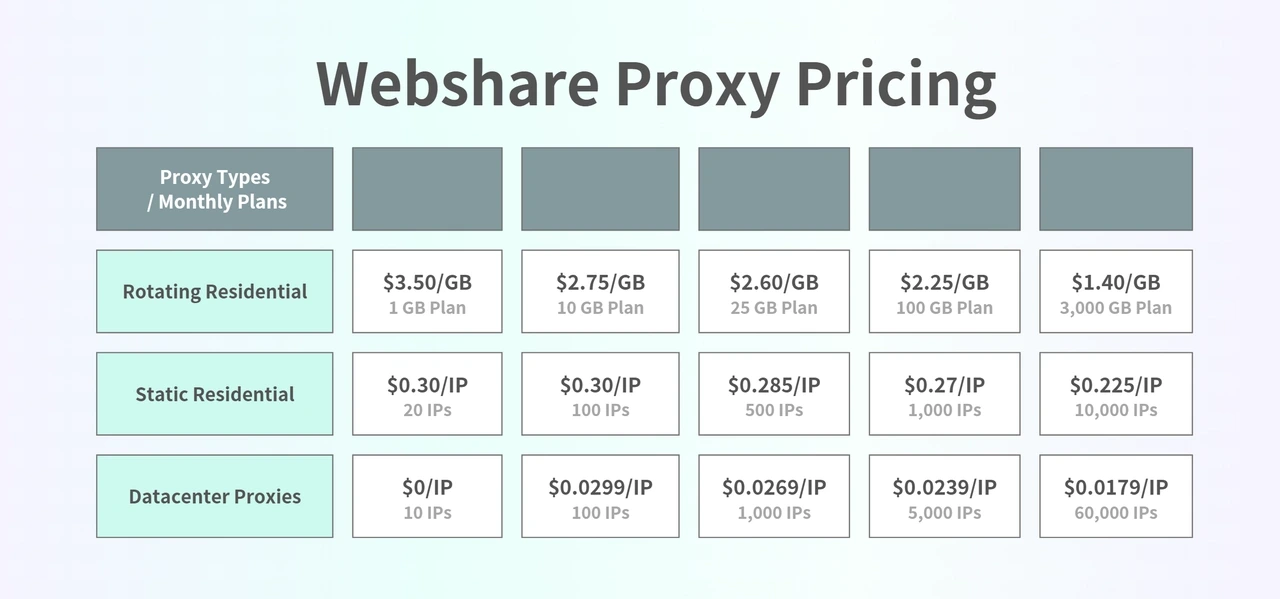
Webshare is the second-cheapest proxy for budget-friendly datacenter proxies and rotating residential plans. If you need cheap datacenter proxies for scraping, it offers a way to scale fast, test cheaply, and keep costs under control, which makes it a good fit for lightweight automation and small scraping projects.
>> Webshare Review: Why It Only Great for Small Projects
Key features:
Proxy types: Residential, ISP, Datacenter
Locations: 195+ countries
10 free datacenter proxies on signup
ISP bulk discounts kick in at just 20 IPs
Support: Email and live chat support
Payment: Credit card, PayPal and more
Pricing:
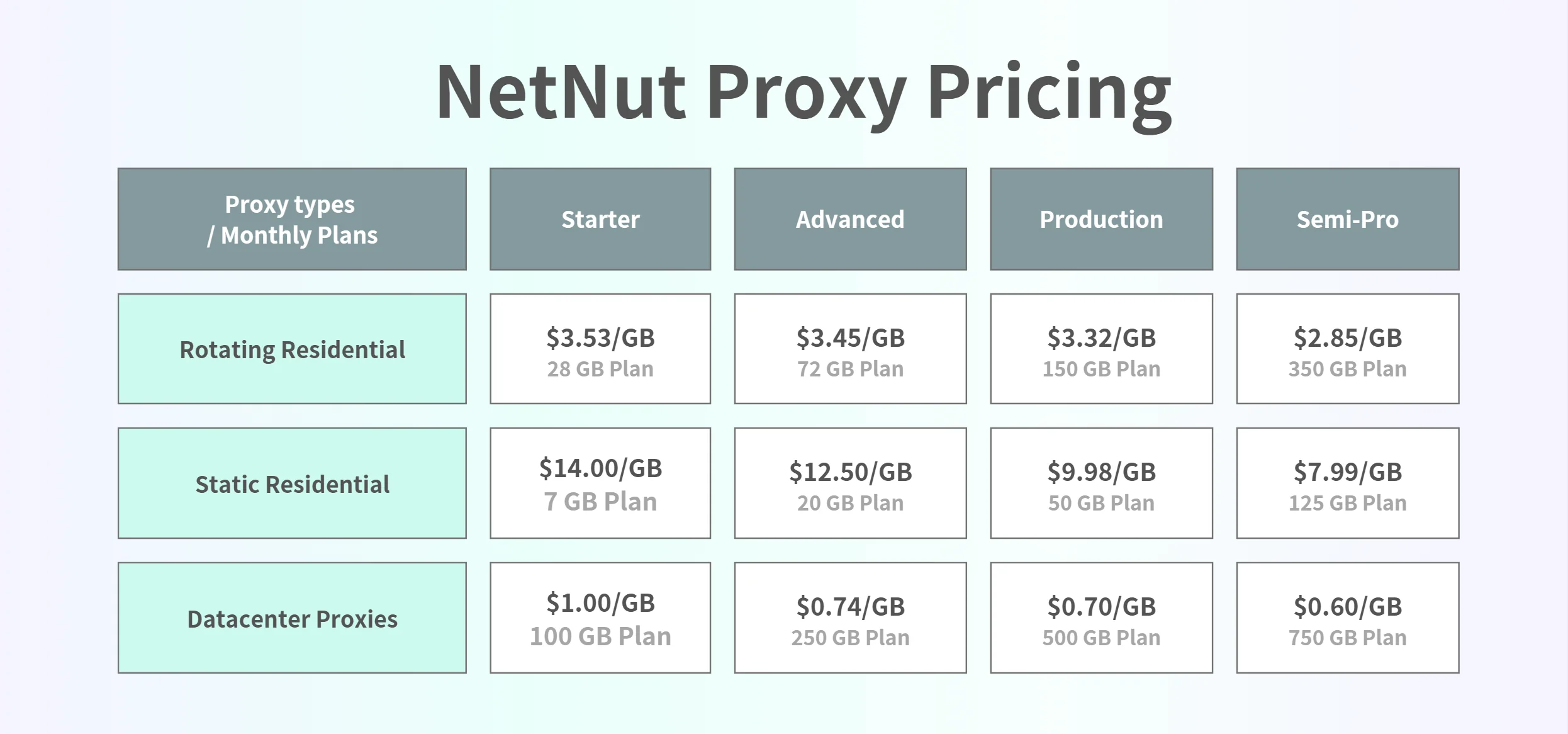
3. NetNut
Bulk pricing drops significantly at 350GB to 800GB
If you run large scraping jobs, NetNut is a better deal once you reach higher-volume tiers like 350GB to 800GB. Just like IPcook's pricing, Netnut's pricing gets more competitive at higher traffic tiers, and its direct ISP-backed network is built for stable, low-latency connections on high-volume tasks like SERP tracking on Google or Bing, e-commerce monitoring, and competitive intelligence.
Key features:
Proxy types: Residential, ISP, Datacenter and mobile proxies
Locations: 195+ countries
ISP-backed infrastructure for stable high-volume scraping
Detailed analytics dashboard with success rate tracking
Support: Email, live chat, Skype (for larger plans)
Free trial: 7-day free trial for businesses
Payment: Credit card, PayPal, wire transfer and more
Pricing:
4. SOAX
One subscription unlocks all proxy types
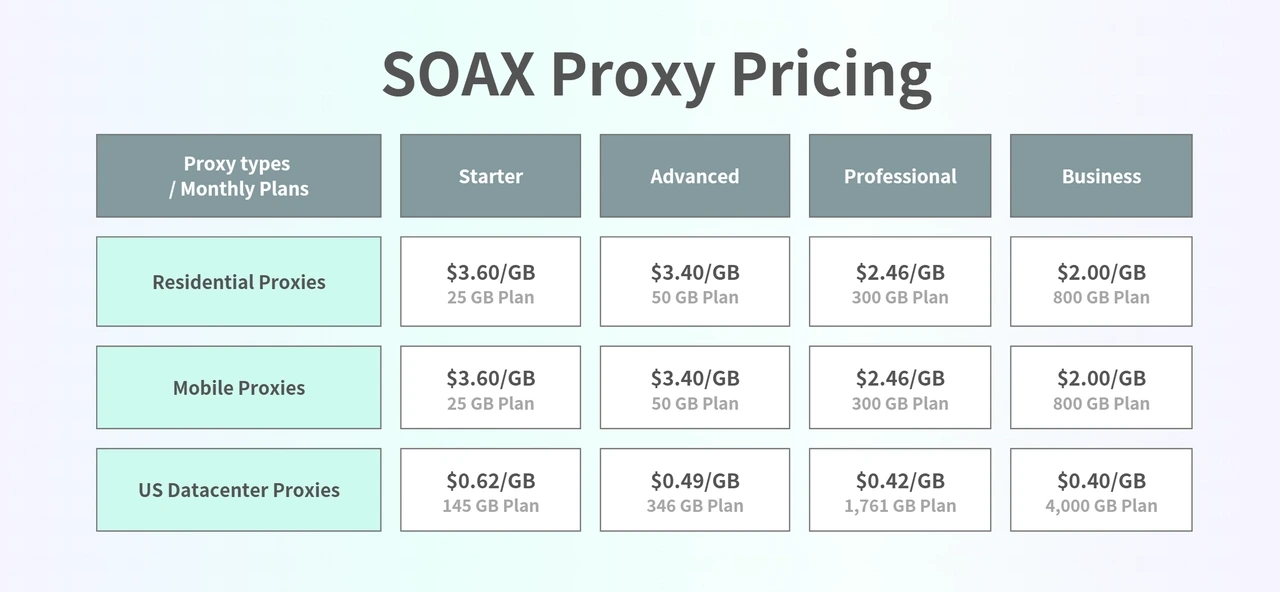
SOAX is a cost-effective private proxy pick for users who need flexible targeting without jumping to enterprise pricing. Its residential plans start with a low-cost trial and are cheap for 25 to 150GB rotating IPs. City and ASN targeting are included across plans, which is uncommon at this price point and makes it a strong choice for localized scraping and market research. If you need location-specific views, it can help when you scrape Instagram data or scrape LinkedIn and want traffic to match a specific region.
Key features:
Proxy types: Residential, Mobile, US Datacenter proxies
Locations: 195+ countries
City and ASN targeting included on all plans
Support: 24/7 live chat and tickets
Trial: 3-day, 400MB trial for $1.99
Payment: Credit card, PayPal, wire transfer and more
Pricing:
5. ProxySeller
Unlimited bandwidth with speeds up to 1 Gbps
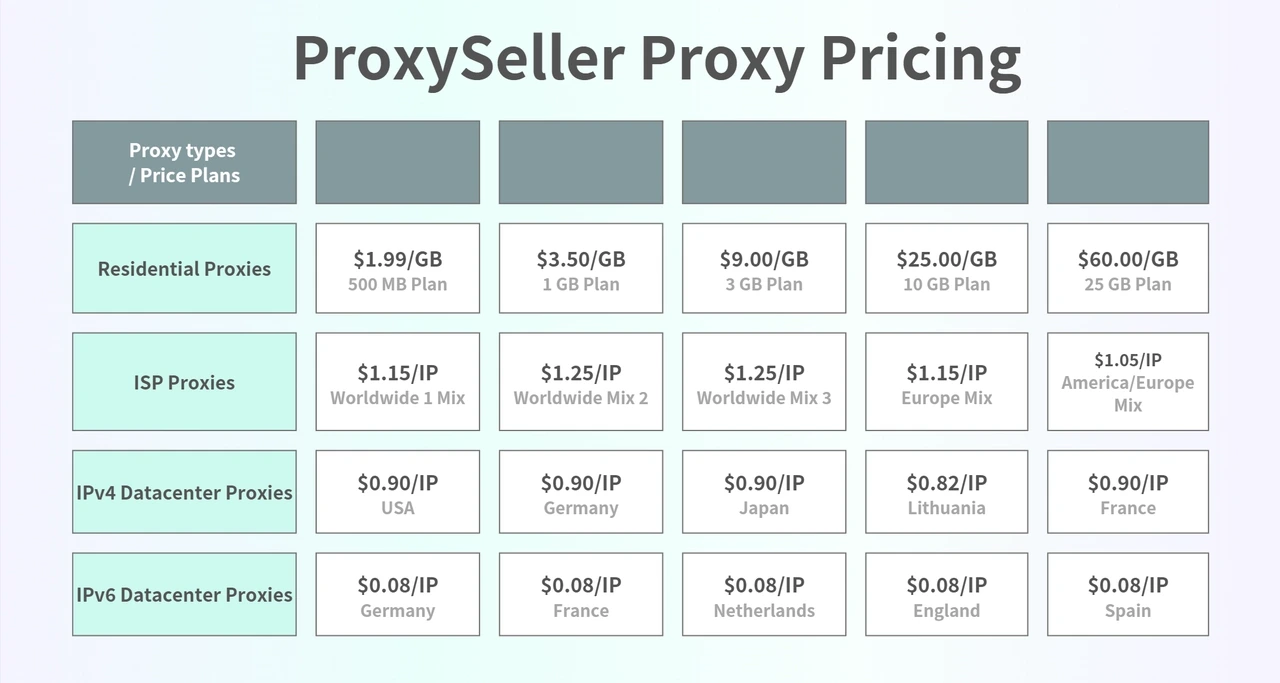
If you want the best cheap DC proxies for fast, simple work, ProxySeller is a no-frills option for users who just need fast datacenter IPs without paying for extra features. The service offers private IPv4 and IPv6 addresses across 40+ countries, with flexible rental periods from short-term access to monthly plans. If your task runs fine on IPv4 or IPv6 and doesn't need residential-level anonymity, this is one of the most affordable ways to scale.
Key features:
Proxy types: Residential, ISP, Mobile, Datacenter (IPv4 and IPv6)
Locations: 40+ countries
No monthly commitment, pay per IP
Support: 24/7 ticket support
Payment: Credit card, PayPal, cryptocurrency
Pricing:
Not the cheapest, but still worth considering
Cheap proxies handle most everyday tasks just fine. But for teams running large-scale operations or dealing with aggressive anti-bot systems, these two bring extra tools and reliability that make them worth a look.
Bright Data
Massive IP pool reduces detection risk at scale
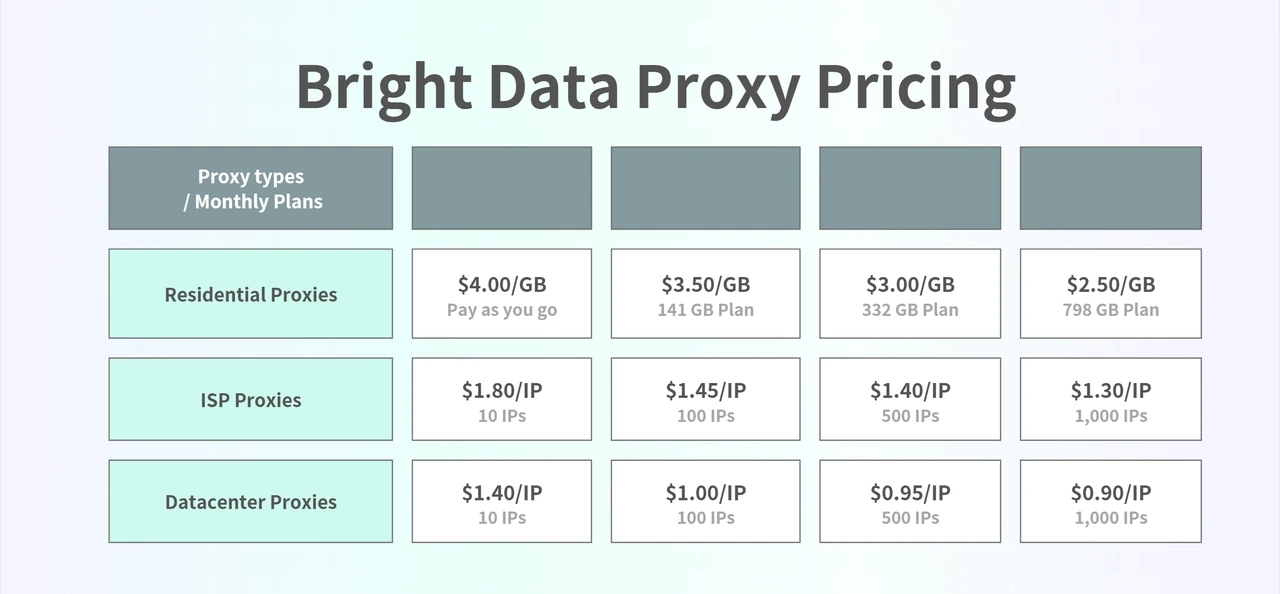
Bright Data is a well-known proxy provider with a huge network. Its residential network spans 150M+ IPs across 195 countries, backed by advanced tools like Web Unlocker and Scraping Browser that handle CAPTCHAs, retries, and JavaScript rendering automatically. If your project is losing hours to bot detection and manual troubleshooting, paying more upfront can save more in the long run.
>> Read the Bright Data review for more information.
Key features:
Proxy types: Residential, ISP, Datacenter
Locations: 195+ countries (150M+ residential IPs)
Web Unlocker handles CAPTCHAs and blocks automatically
Scraping Browser works with Puppeteer and Playwright
Support: 24/7 live chat and dedicated account manager
Free trial: 7-day free trial for businesses
Payment: Credit card, PayPal, wire transfer, and more
Pricing:
Oxylabs
Advanced targeting: ZIP code and coordinate-level precision
Oxylabs is a well-known name in proxies and data collection tools. It's built for enterprise teams, so it won't feel like a budget brand, but its ISP pricing can still be competitive. Its ISP proxies give you the anonymity of residential IPs without the instability, making them ideal for long-running sessions. That's why it gets used for AI data collection, price intelligence, e-commerce monitoring, and managing multiple accounts on platforms like Facebook, TikTok, Twitter, or Instagram.
>> Read the Oxylabs review for more information.
Key features:
Proxy types: Residential, ISP, Datacenter, Mobile
Locations: 195+ countries (175M+ residential IPs)
ISP pricing competitive within enterprise tier ($1.20–$1.60/IP)
High success rates and stable connections at scale
Support: 24/7 live chat and dedicated account manager
Free trial: 7-day free trial for businesses
Payment: Credit card, PayPal, wire transfer
Pricing:
How to Choose a Cheap Proxy Right for You
Pick Based on Your Task
The lowest price isn’t always the best fit. For simple scraping, quick tests, or routine browsing, cheap datacenter proxies, especially a cheap IPv4 proxy, usually get the job done as a low-cost proxy option. For multi-account logins, ads, or app testing, affordable residential proxies face fewer blocks. For long sessions and frequent logins, budget-friendly ISP proxies are the most stable middle ground.
Cheap Proxy Types Compared
Proxy Type | Best For | Pricing Logic | Main Limitation |
|---|---|---|---|
Datacenter proxies | Fast scraping, bulk checks, simple automation | Usually the lowest cost per IP | Easier for strict websites to detect |
ISP proxies | Stable logins, account management, long sessions | Often priced by IP and rental period | More expensive than datacenter proxies |
Residential proxies | Geo-targeted scraping, local browsing, tougher websites | Usually priced by GB | Costs can rise with heavy traffic use |
SOCKS5 proxies | Apps, tools, bots, and flexible traffic routing | Depends on provider and proxy type | Not every cheap plan includes SOCKS5 support |
HTTP/HTTPS proxies | Browser tasks, web scraping, and basic automation | Often included with residential or datacenter plans | Less flexible than SOCKS5 outside web traffic |
Match Your Budget to the Proxy Type
Cheap proxies fall into a few clear tiers:
Datacenter → lowest cost and fastest speeds, but easier to detect on strict sites.
ISP → mid-range pricing with strong stability, ideal for accounts and longer sessions.
Residential → the most reliable among “cheap” options, better for tougher websites and scraping workloads.
Choose the lowest tier that can still handle your task. If you need more control or higher success rates, you may end up in the cheap premium proxies range, where tools and reliability matter more than the lowest price.
Simple Checks Before You Buy
Before committing to any plan, confirm a few basics:
The provider clearly states where the IPs come from
You can choose rotating or sticky sessions as needed
The dashboard is simple enough to manage ports and settings
Traffic or IPs do not expire unexpectedly
A small starter plan or test option is available
These quick checks help you avoid slow speeds, recycled IPs, or unstable low-cost plans.
Free Proxies vs Cheap Proxies: What’s Worth It in 2026?
Why Free Proxies Are Tempting
Free proxies are easy to find and cost nothing to try, which makes them appealing when you only want to test a script, load a blocked page, or confirm your setup works. There is no signup, no payment, and no commitment. You simply copy the address, paste it into your tool, and you are online. For many users, this feels like a low-risk way to experiment before paying for anything.
Real Problems With Free Proxy Lists
The issues begin once you try to use free proxies for anything beyond a single request. A public cheap proxy list often turns into the cheapest shared proxy pool on the internet, so blocks and failures pile up fast. Most public proxies are overcrowded, unstable, and already show up on blocklists across major websites. Success rates drop, pages fail to load, and connections disappear before tasks finish. Even simple actions such as logging in or refreshing a page become unreliable because these proxies rotate or vanish without warning. They are not always unsafe, but they are almost never stable enough for real work.
Using a Cheap Proxy Is a Better Deal
A low-cost proxy becomes the smarter option the moment your tasks involve scraping, logins, automation, or anything that needs a steady connection. For a small amount of money, you avoid constant retries and the time wasted fighting failing free lists. Cheap proxies offer cleaner IPs, predictable sessions, and far better consistency without stepping into premium pricing. Even small projects run smoothly when you are not relying on unstable public proxies.
Final Thoughts: Test IPs and Quality Before You Scale
Before you buy a bigger package, test IP quality on your real target sites. Most services offer a free or paid trial. Run a small batch, track success rate, and confirm sticky sessions stay consistent. That quick check can save you from wasting money on the wrong plan.
Need a low-risk start? IPcook lets you buy 1GB for $3.20, and the minimum top-up is only $5.